WooCommerce product object caching can reduce repeated product loads, but stores still need QA around prices, stock status, variations, sale schedules, filters, and cart behavior. Performance improvement is only useful when shoppers see the right product data.
Use this for new WooCommerce stores, staging launches, product catalog migrations, or performance work that touches object cache, page cache, product queries, or variation-heavy catalogs.
Quick answer
WooCommerce Product Object Caching New Store Test Plan should be handled with a narrow evidence-first workflow: create test products, change catalog data, compare views, then verify the result before making broader changes.
What to check first
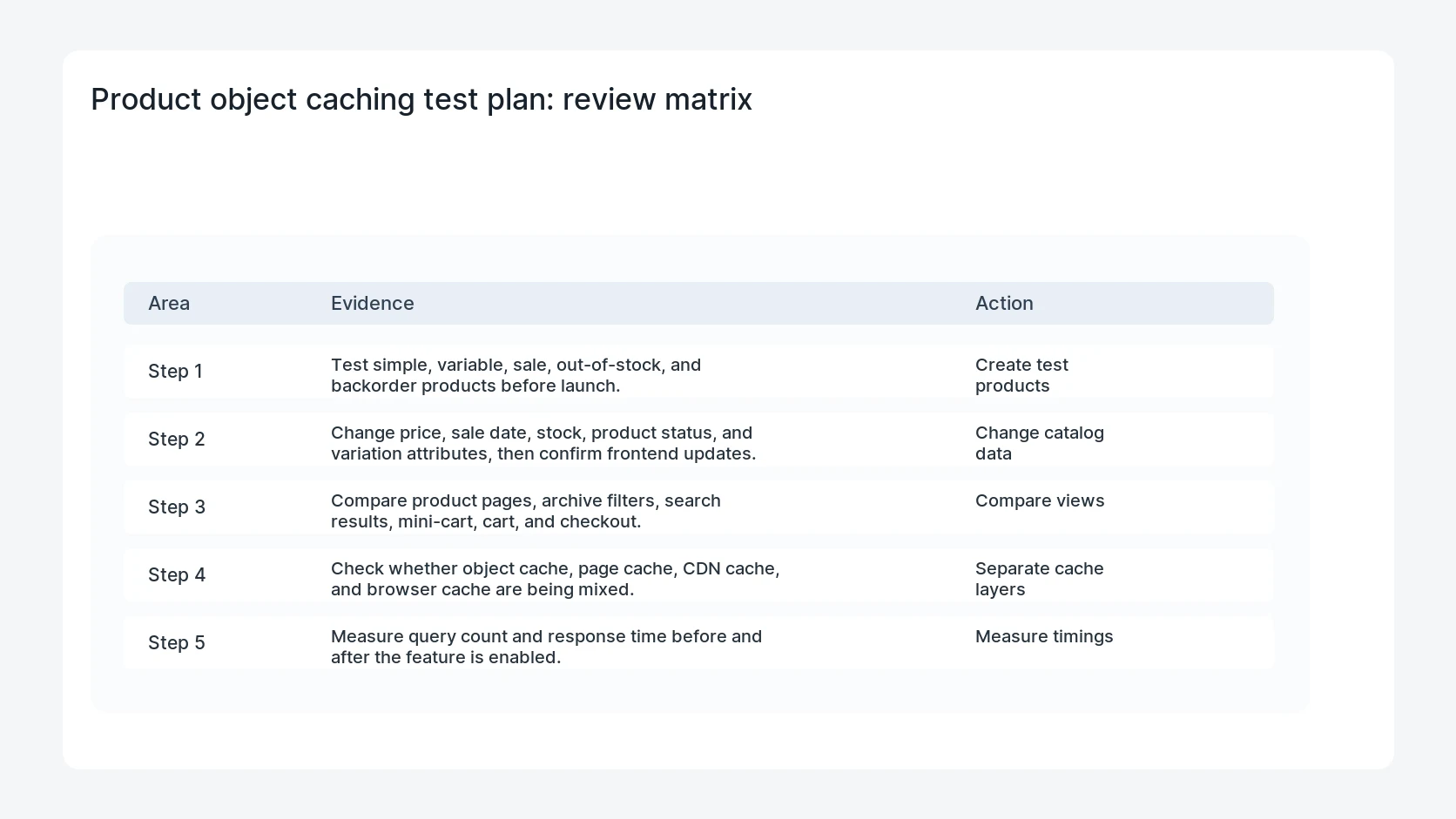
- Test simple, variable, sale, out-of-stock, and backorder products before launch.
- Change price, sale date, stock, product status, and variation attributes, then confirm frontend updates.
- Compare product pages, archive filters, search results, mini-cart, cart, and checkout.
- Check whether object cache, page cache, CDN cache, and browser cache are being mixed.
- Measure query count and response time before and after the feature is enabled.
Diagnostic table
Use this table to keep the work practical. It connects the symptom to evidence and a verification step.
| Action | Evidence to collect | How to verify |
|---|
| Create test products | Test simple, variable, sale, out-of-stock, and backorder products before launch. | Price, stock, sale, and variation updates appear in every shopper-facing view. |
| Change catalog data | Change price, sale date, stock, product status, and variation attributes, then confirm frontend updates. | Guest and logged-in customers see the correct state. |
| Compare views | Compare product pages, archive filters, search results, mini-cart, cart, and checkout. | Cache purge rules are documented for catalog edits. |
| Separate cache layers | Check whether object cache, page cache, CDN cache, and browser cache are being mixed. | Performance improves without stale product data. |
Why this usually happens
- Product data appears in many places, not just on the product detail page.
- Variation attributes and sale prices are common places to find stale cache behavior.
- Object cache and page cache can hide different classes of bugs.
- A new-store default may be correct while an extension still assumes uncached product objects.
Field notes
- Use one product intentionally designed for cache QA, with price, stock, sale, and variation changes.
- Run the same test as a guest shopper and as a logged-in customer.
- Keep before and after timings so the store owner can see whether the change helped.
Useful command or data shape
Adapt paths, IDs, and privacy handling to the site before running commands or storing data on production.
test_product:
  sku: CACHE-QA-001
  states: simple, variable, sale, out_of_stock, backorder
  views: product, archive, search, cart, checkout
  cache_layers: object_cache, page_cache, cdn
  metrics: query_count, ttfb, stale_result_count
Safe fix order
Do the work in a sequence that makes each result easy to prove. Stop if a step produces new evidence that changes the incident scope.
- Create test products
- Change catalog data
- Compare views
- Separate cache layers
- Measure timings
What to tell the client or owner
Give the launch owner the product IDs used for cache QA, the cache layers tested, and any purge rule that must be followed after catalog updates.
Production verification checklist
- Price, stock, sale, and variation updates appear in every shopper-facing view.
- Guest and logged-in customers see the correct state.
- Cache purge rules are documented for catalog edits.
- Performance improves without stale product data.
Mistakes to avoid
- Do not judge the fix by one browser or the homepage only.
- Do not delete evidence before recording usernames, file paths, timestamps, and response headers.
- Do not add a cache, security, or tracking plugin while the original problem is still unclear.
- Do not leave test users, temporary debug logs, or broad API keys active after verification.
When HandL WP should help
Bring in help when this affects leads, checkout, search visibility, malware risk, paid media reporting, or a client production site. HandL WP can trace the issue through WordPress, hosting, cache, tracking, and Search Console, then verify the workflow after the technical fix.
If this is active on a production site, test WooCommerce caching before launch.
Related HandL WP guides
Use these related guides when the same issue touches tracking, security, checkout, or crawler visibility.
Helpful references